Wplace协议分析
Wplace的技术栈、协议及接口的分析。
免责声明:部分没有被引用的接口没有列出,因为随时有可能移除,如果有任何错误,请及时联系我。
目录:
- 概念与系统
- 协议
- 认证
- Cookie
- GET
/me - POST
/me/update - GET
/me/profile-pictures - POST
/me/profile-picture/change - POST
/me/profile-picture - GET
/alliance - POST
/alliance - POST
/alliance/update-description - GET
/alliance/invites - GET
/alliance/join/{invite} - POST
/alliance/update-headquarters - GET
/alliance/members/{page} - GET
/alliance/members/banned/{page} - POST
/alliance/give-admin - POST
/alliance/ban - POST
/alliance/unban - GET
/alliance/leaderboard/{mode} - POST
/favorite-location - POST
/favorite-location/delete - POST
/purchase - POST
/flag/equip/{id} - GET
/leaderboard/region/{mode}/{country} - GET
/leaderboard/country/{mode} - GET
/leaderboard/player/{mode} - GET
/leaderboard/alliance/{mode} - GET
/leaderboard/region/players/{city}/{mode} - GET
/leaderboard/region/alliances/{city}/{mode} - GET
/s0/tile/random - GET
/s0/pixel/{tileX}/{tileY}?x={x}&y={y} - GET
/files/s0/tiles/{tileX}/{tileY}.png - POST
/s0/pixel/{tileX}/{tileY} - POST
/report-user
- 反作弊
- 附录
概念与系统
大多数命名为主观命名,不代表和源码或其他wplace项目中命名一致
地图
关键字:
Map / Canvas / World
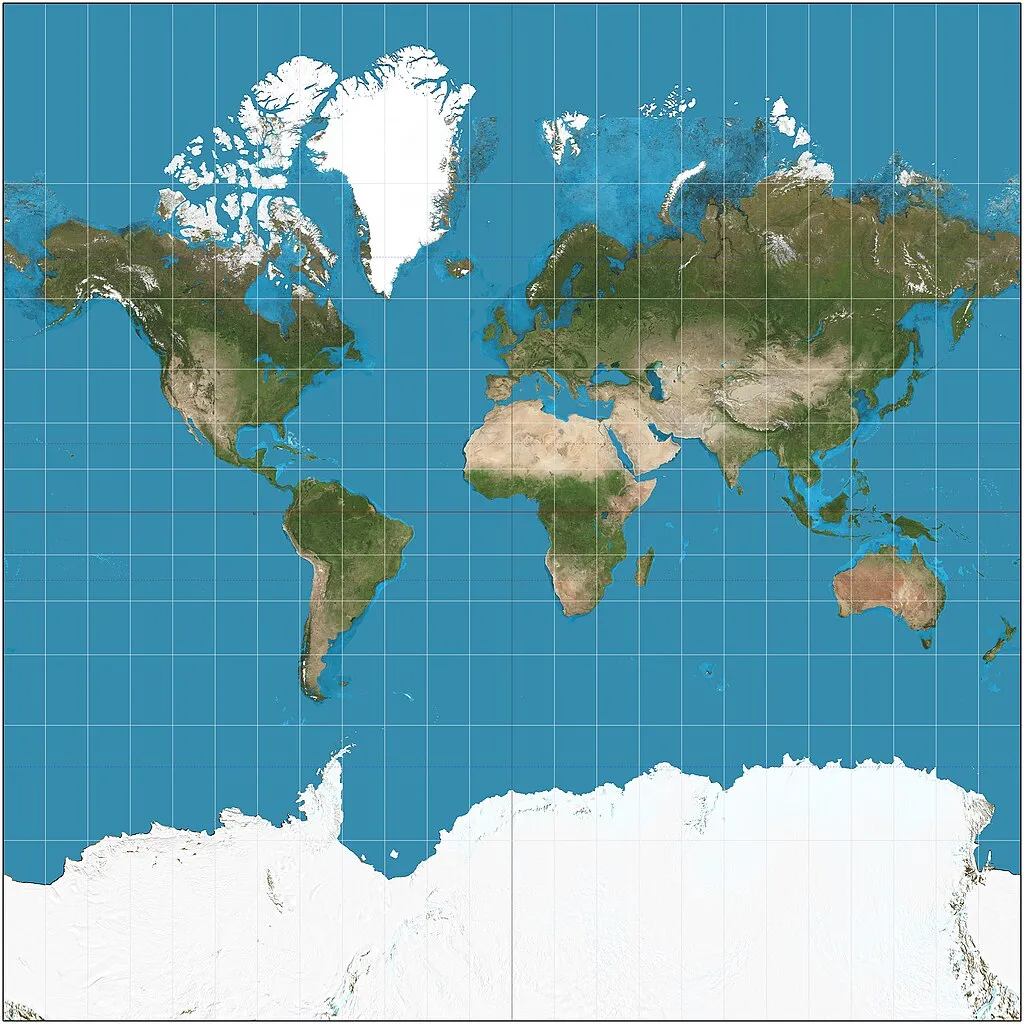
地图指Wplace的整体画布。基于墨卡托投影(Mercator Projection / Web Mercator)渲染,地图采用OpenFreeMap的Liberty Style。地图包含2048x2048也就是4,194,304个瓦片,瓦片在前端通过Canvas覆盖在地图之上。
地图中大部分现实中没有属地/有争议的位置,都被划分为了最近的陆地所属国家或地区的一部分,例如,北太平洋被划分到了美国的檀香山,南太平洋被划分到了澳大利亚的亚当斯敦。
地图的总像素数量为 4,194,304,000,000(约 4.1 trillion / 4.1 兆 / 4.1 万亿)。
瓦片
关键字:
Tile / Chunk
瓦片是wplace渲染画布的最小单位。每个瓦片在服务端是一张1000×1000的PNG图像,包含1,000,000个像素。
瓦片对应的数据类型为Vec2i,即 x 和 y。
API中提到的相对坐标也就是从所在瓦片的0开始坐标。
计算对应经纬度
整个地图在横向与纵向的瓦片数量均为2048。通过这个即可计算出Zoom值:
int n = 2048; // 瓦片数量
int z = (int) (Math.log(n) / Math.log(2)); // 通过换底公式求出Zoom经过这个公式计算,可以求出zoom约为11,随后即可使用下列算法计算经纬度:
double n = Math.pow(2.0, 11); // zoom 为 11
double lon = (x + 0.5) / n * 360.0 - 180.0;
double latRad = Math.atan(Math.sinh(Math.PI * (1 - 2 * (y + 0.5) / n)));
double lat = Math.toDegrees(latRad);其中的lon和lat即为经纬度的值
公式参考自:Slippy map tilenames
相关接口
颜色
关键字:
Color / Palette
Wplace提供了64种颜色,前32种为免费颜色,后32种每个需要2,000Droplets解锁。
对于颜色是否已经解锁,前端通过位掩码检查 (Bitmask Check)来检查extraColorsBitmap,extraColorsBitmap为前端获得用户资料接口返回的Json中的一个字段。
其检查逻辑为:
int extraColorsBitmap = 0;
int colorId = 63; // 需要检查的颜色ID
boolean unlocked;

if (colorId < 32) { // 跳过前32因为前32个颜色是免费的
    unlocked = true;
} else {
    int mask = 1 << (colorId - 32);
    unlocked = (extraColorsBitmap & mask) != 0;
}
免责声明:此代码为笔者根据Wplace中的混淆过的JS代码分析得出的Java代码,而非原始代码。
对于颜色代码,请检查附录
相关接口
旗帜
关键字:
Flag
Wplace包含251种旗帜,购买旗帜之后可以让你在对应的地区绘制时候节省10%的像素,一个旗帜的价格为20,000Droplets。
对于旗帜是否解锁通过一个自定义的BitMap来实现,以下是这个BitMap的JS代码:
class Tt {
    constructor(e) {
        u(this, "bytes");
        this.bytes = e ?? new Uint8Array
    }
    set(e, a) {
        const n = Math.floor(e / 8),
            c = e % 8;
        if (n >= this.bytes.length) {
            const r = new Uint8Array(n + 1),
                i = r.length - this.bytes.length;
            for (let h = 0; h < this.bytes.length; h++) r[h + i] = this.bytes[h];
            this.bytes = r
        }
        const l = this.bytes.length - 1 - n;
        a ? this.bytes[l] = this.bytes[l] | 1 << c : this.bytes[l] = this.bytes[l] & ~(1 << c)
    }
    get(e) {
        const a = Math.floor(e / 8),
            n = e % 8,
            c = this.bytes.length;
        return a > c ? !1 : (this.bytes[c - 1 - a] & 1 << n) !== 0
    }
}BitMap可读的Java代码参见附录
前端通过用户资料接口获得flagsBitmap字段之后,通过Base64解码为Bytes然后传入BitMap读取某个旗帜ID是否已解锁。
对于全部旗帜代码,请参考附录
相关接口
等级
关键字:
Level
等级可以根据已绘制的像素计算
double totalPainted = 1; // 已经绘制的像素数量
double base = Math.pow(30, 0.65);
double level = Math.pow(totalPainted, 0.65) / base;每升一级会获得500droplets和增加2最大像素
商店
关键字:
Store / Purchase
商店可以通过游戏内的虚拟货币 Droplet 购买物品,以下是物品列表
| 物品ID | 物品名字 | 价格(Droplet) | Variants |
|---|---|---|---|
70 |
+5 Max. Charges | 500 |
无 |
80 |
+30 Paint Charges | 500 |
无 |
100 |
解锁付费颜色 | 2000 |
颜色ID |
110 |
解锁旗帜 | 20000 |
旗帜ID |
相关接口
其他物品ID预留给了充值物品(现金支付)
协议
如无特殊说明,URL主机为backend.wplace.live
对于常见的API错误,参阅附录
认证
认证通过Cookie中的字段j实现,在登录之后,后端会将Json Web Token保存到Cookie中,后续请求wplace.live和backend.wplace.live都会携带这个Cookie
Token是一段被编码的文本,而不是一个普通的随机字符串,可以通过jwt.io或任何JWT工具解码得到一些信息。
{
  "userId": 1,
  "sessionId": "",
  "iss": "wplace",
  "exp": 1758373929,
  "iat": 1755781929
}其中exp字段为过期时间戳,可以仅通过token得出过期时间。
Cookie
通常来说请求接口只需要携带j一个Cookie即可,但是如果服务器处于高负载,开发者会开启Under Attack模式,如果开启Under Attack模式需要额外携带一个有效的cf_clearanceCookie,否则会弹出Cloudflare质询。
需要确保你在让自动程序发起请求时请求头中的大部分字段(如 User-Agent、Accept-Language 等)和你获得cf_clearance的浏览器一致,否则会验证不通过仍然会弹出质询。
GET `/me`
获得用户信息
请求
- 需要
j完成认证
成功请求时的返回
{
    // int: Alliance ID
    "allianceId": 1,
    // enum: Alliance 权限
    // admin/member
    "allianceRole": "admin",
    // boolean: 是否被封禁
    "banned": false,
    // object: 像素信息
    "charges": {
        // int: 恢复像素的间隔,单位为毫秒,30000毫秒也就是30秒
        "cooldownMs": 30000,
        // float: 剩余的像素
        "count": 35.821833333333586,
        // float: 最高像素数量
        "max": 500
    },
    // string: ISO-3166-1 alpha-2地区代码
    // 参考:https://en.wikipedia.org/wiki/ISO_3166-1_alpha-2
    "country": "JP",
    // string: discord用户名
    "discord": "",
    // int: 剩余droplets
    "droplets": 75,
    // int: 装备的旗帜
    "equippedFlag": 0,
    // object: 灰度测试标记,其内部的意义不明确
    // 例如其中的variant值为koala(考拉),不明确其内部意义,仅为一个代号。
    // 但是会跟着请求头传出去,如果2025-09_pawtect的variant是disabled则不会发送pawtect-token
    // 说明部分用户没有被启用新的安全机制
    "experiments": {
        "2025-09_pawtect": {
            "variant": "koala"
        }
    },
    // int: extraColorsBitmap,参阅 #颜色 小节了解其作用。
    "extraColorsBitmap": 0,
    // array: 收藏的位置
    "favoriteLocations": [
        {
            "id": 1,
            "name": "",
            "latitude": 46.797833514893085,
            "longitude": 0.9266305280273432
        }
    ],
    // string: 已解锁的旗帜列表,参阅 #旗帜 小节了解其作用。
    "flagsBitmap": "AA==",
    // enum: 一般不会出现,如果你有权限才会额外显示
    // moderator/global_moderator/admin
    "role": "",
    // int: 用户ID
    "id": 1,
    // boolean: 是否有购买,如果有则会在菜单显示订单列表
    "isCustomer": false,
    // float: 等级
    "level": 94.08496005353335,
    // int: 最大的收藏数量,默认为15,暂时没有发现如何提升
    "maxFavoriteLocations": 15,
    // string: 用户名
    "name": "username",
    // boolean: 是否需要手机号验证,如果是则会在访问时弹出手机号验证窗口
    "needsPhoneVerification": false,
    // string: 头像URL或base64,需要根据前缀判断(例如data:image/png;base64,)
    "picture": "",
    // int: 已经绘制的像素数量
    "pixelsPainted": 114514,
    // boolean: 是否在alliance页面展示你最后一次绘制的位置
    "showLastPixel": true,
    // string: 你的解除封禁时间戳,如果是1970年则意味着没有被封禁或者已经被永久封禁。
    "timeoutUntil": "1970-01-01T00:00:00Z"
}
POST `/me/update`
更新当前用户的个人信息
请求
- 需要
j完成认证
请求示例
{
    // string:用户昵称
    "name": "cubk",
    // boolean:是否在alliance展示最后一个像素
    "showLastPixel": true,
    // discord用户名
    "discord": "_cubk"
}
成功返回
{
    "success": true
}
错误返回
{
    "error": "The name has more than 16 characters",
    "status": 400
}
请求体不合法
GET `/me/profile-pictures`
获得头像列表
一个人可以有多个头像(添加一个需要20,000Droplets),然后可以随时换头像列表中的任何一个头像
请求
- 需要
j完成认证
成功返回
// array: 所有头像
[
    {
        // int: 头像ID
        "id": 0,
        // string: 头像URL或者Base64,可以通过是否以data:image/png;base64,开头判断
        "url": ""
    }
]
如果你没有任何头像则会返回空的
POST `/me/profile-picture/change`
更换头像
请求
- 需要
j完成认证
示例请求
更换已有自定义头像
{
    // int: 头像ID,需要确保你添加了这个头像
	"pictureId": 1
}
重置头像
{}请求空的JsonObject可以重置头像
成功返回
{
	"success": true
}
POST `/me/profile-picture`
上传头像
请求
- 需要
j完成认证 - 请求体为Multipart File:
image
成功返回
{
	"success": true
}
错误返回
{
	"error": "Forbidden",
	"status": 403
}
GET `/alliance`
获得Alliance信息
请求
- 需要
j完成认证
成功返回
{
	// string: Alliance介绍
	"description": "CCB",
	// object: 总部(Headquarters)
	"hq": {
		"latitude": 22.535013525851937,
		"longitude": 114.01152903098966
	},
	// int: Alliance ID
	"id": 453128,
	// int: 成员数量
	"members": 263,
	// string: 名字
	"name": "Team RealB",
	// string: 已绘制的总数
	"pixelsPainted": 1419281,
	// enum: 你的权限
	// admin/memeber
	"role": "admin"
}
错误返回
{
	"error": "Not Found",
	"status": 404
}
没有加入任何Alliance
POST `/alliance`
创建一个Alliance
请求
- 需要
j完成认证
请求示例
{
    // string: Alliance名字,不能重名。
	"name": "Team RealB"
}
成功返回
{
    // int: 创建完的Alliance ID
	"id": 1
}
错误返回
{
	"error": "name_taken",
	"status": 400
}
Alliance名字已经被占用
{
    "error": "Forbidden",
    "status": 403
}
已有一个Alliance但是仍然尝试创建,正常情况下不会触发。
POST `/alliance/update-description`
更新Alliance简介
请求
- 需要
j完成认证
示例请求
{
    "description": "bbb"
}
成功返回
{
	"success": true
}
错误返回
{
	"error": "Forbidden",
	"status": 403
}
没有Alliance或权限不是admin
GET `/alliance/invites`
获得Alliance的邀请链接
请求
- 需要
j完成认证
成功返回
// array: Alliance邀请链接,通常只有一个且格式为UUID
[
    "fe7c9c32-e95a-4f5f-a866-554cde2149c3"
]
错误返回
{
	"error": "Forbidden",
	"status": 403
}
没有Alliance或权限不是admin
GET `/alliance/join/{invite}`
通过Invite UUID加入Alliance,获得Invite UUID参阅/alliance/invites
请求
- 需要
j完成认证 - URL中的{invite}参数为邀请UUID
- 示例URL(设置为中国国旗):
/alliance/join/fe7c9c32-e95a-4f5f-a866-554cde2149c3
- 示例URL(设置为中国国旗):
成功返回
{
    "success": "true"
}
如果加入的目标和你已有的Alliance一致,也会返回成功
错误返回
{
    "error": "Not Found",
    "status": 404
}
没有找到目标Alliance
{
  "error": "Already Reported",
  "status": 208
}
已经加入了一个Alliance
{
	"error": "Forbidden",
	"status": 403
}
已被这个Alliance拉黑
POST `/alliance/update-headquarters`
更新Alliance的总部(Headquarters)
请求
- 需要
j完成认证
示例请求
{
	"latitude": 22.537655528880563,
	"longitude": 114.0274942853182
}
成功返回
{
	"success": true
}
错误返回
{
	"error": "Forbidden",
	"status": 403
}
没有Alliance或权限不是admin
GET `/alliance/members/{page}`
获得Alliance成员列表,有分页系统,有可能需要分多页获取如果成员超过50个
请求
- 需要
j完成认证 - URL中的{page}参数为页码,从0开始
- 示例URL(获得第一页):
/alliance/members/0
- 示例URL(获得第一页):
成功返回
{
    // array: 一页最多50个
	"data": [{
	    // int: 用户ID
		"id": 1,
		// string: 用户名
		"name": "cubk'",
		// enum: 权限
		// admin/memeber
		"role": "admin"
	}, {
		"id": 1,
		"name": "SillyBitch",
		"role": "admin"
	}, {
		"id": 1,
		"name": "cubk",
		"role": "member"
	}],
	// boolean: 是否还有下一页
	"hasNext": true
}
错误返回
{
	"error": "Forbidden",
	"status": 403
}
没有Alliance或权限不是admin
GET `/alliance/members/banned/{page}`
获得Alliance已经拉黑的成员列表,有分页系统,有可能需要分多页获取如果成员超过50个
已经拉黑的成员无法再加入Alliance
请求
- 需要
j完成认证 - URL中的{page}参数为页码,从0开始
- 示例URL(获得第一页):
/alliance/members/banned/0
- 示例URL(获得第一页):
成功返回
{
	"data": [{
		"id": 1,
		"name": "SuckMyDick"
	}],
	"hasNext": false
}
和普通成员接口大致一致,但是没有
role,因为已经拉黑就不在alliance里了
错误返回
{
	"error": "Forbidden",
	"status": 403
}
没有Alliance或权限不是admin
POST `/alliance/give-admin`
将一个成员提升为Admin,无法降级
请求
- 需要
j完成认证
示例请求
{
    // int: 需要提升的用户ID
	"promotedUserId": 1
}
成功返回
本接口没有返回,响应码是200即成功
错误返回
{
	"error": "Forbidden",
	"status": 403
}
没有Alliance或权限不是admin
POST `/alliance/ban`
踢出并拉黑一个成员
拉黑之后如果不解除拉黑成员无法重新加入
请求
- 需要
j完成认证
示例请求
{
    // int: 需要踢出或拉黑的用户ID
	"bannedUserId": 1
}
成功返回
{
	"success": true
}
错误返回
{
	"error": "Forbidden",
	"status": 403
}
没有Alliance或权限不是admin
POST `/alliance/unban`
解除拉黑一个成员,解除之后他不会自动回到Alliance,只是可以重新加入了而已。
请求
- 需要
j完成认证
示例请求
{
    // int: 需要解除拉黑的用户ID
	"unbannedUserId": 1
}
成功返回
{
	"success": true
}
错误返回
{
	"error": "Forbidden",
	"status": 403
}
没有Alliance或权限不是admin
GET `/alliance/leaderboard/{mode}`
获得Alliance内玩家排行榜,仅限前50个。
请求
- 需要
j完成认证 - URL中的
mode代表时间范围,是一个枚举,可以是以下任何一个值:todayweekmonthall-time
- 示例URL(今日排行榜):
/alliance/leaderboard/today
成功返回
[
  {
    // int: 用户ID
    "userId": 10815100,
    // string: 用户名
    "name": "做爱",
    // int: 旗帜ID,旗帜列表参阅附录
    "equippedFlag": 0,
    // int: 已绘制像素数量
    "pixelsPainted": 32901,
    // 最后一次绘制的经纬度,如果用户关闭了showLastPixel则不会有这两个字段
    "lastLatitude": 22.527739206672393,
    "lastLongitude": 114.02762695312497
  },
  {
    "userId": 10850297,
    "name": "尹永铉",
    "equippedFlag": 0,
    "pixelsPainted": 31631
  }
]
POST `/favorite-location`
收藏一个位置
请求
- 需要
j完成认证
示例请求
{
	"latitude": 22.5199456234827,
	"longitude": 114.02428677802732
}
成功返回
{
    // int: 收藏ID
	"id": 1,
	"success": true
}
错误返回
{
  "error": "Forbidden",
  "status": 403
}
收藏数量超过maxFavoriteLocations
POST `/favorite-location/delete`
取消收藏位置
请求
- 需要
j完成认证
示例请求
{
    // int: 收藏ID
	"id": 1
}
成功返回
{
    "success": true
}
传入任何ID即使是没有收藏的或者不存在的也会返回成功
POST `/purchase`
购买物品,相关定义请阅读商店小节
请求
- 需要
j完成认证
示例请求
{
    // object: 固定字段product
	"product": {
	    // int: 物品id
		"id": 100,
		// int: 购买数量,对于Paint Charges/Max Charge可以购买多个
		"amount": 1,
		// int: 变体值,部分物品存在变体,如果没有变体不需要这个值
		"variant": 49
	}
}
成功返回
{
	"success": true
}
错误返回
所有错误在本接口返回的均一样
{"error":"Forbidden","status":403}{"success":true}可能是巴西人毒品吃多了或者被足球精准命中后脑勺了导致大脑不太好使这里写错了但是这个响应体确实他妈的长这样,可能需要额外处理

POST `/flag/equip/{id}`
设置展示旗帜
请求
成功返回
{
	"success": true
}
错误返回
{
	"error": "Forbidden",
	"status": 403
}
未解锁旗帜
GET `/leaderboard/region/{mode}/{country}`
获得某个国家/地区的地区绘制排行榜(仅前50个)
请求
- URL中的
mode代表时间范围,是一个枚举,可以是以下任何一个值:todayweekmonthall-time
- URL中的
country为地区ID,对应的表请参阅附录 - 示例URL(中国今天的城市排行榜):
/leaderboard/region/today/45
成功返回:
[
  {
    // int: 排行榜ID,仅用于内部
    "id": 111006,
    // int: 地区名字
    "name": "Yongzhou",
    // int: 地区ID
    "cityId": 4205,
    // int: 地区编号
    "number": 1,
    // int: 国家/地区ID
    "countryId": 45,
    // int: 已绘制数量
    "pixelsPainted": 389274,
    // 最后一次绘制的经纬度
    "lastLatitude": 26.59347856637528,
    "lastLongitude": 111.63313476562497
  },
  {
    "id": 112043,
    "name": "Fuzhou",
    "cityId": 4381,
    "number": 11,
    "countryId": 45,
    "pixelsPainted": 307461,
    "lastLatitude": 25.21710750136907,
    "lastLongitude": 120.43010742187496
  }
}
GET `/leaderboard/country/{mode}`
获得所有国家/地区排行榜,仅限前50个
请求
- URL中的
mode代表时间范围,是一个枚举,可以是以下任何一个值:todayweekmonthall-time
- 示例URL(今天的国家地区排行榜):
/leaderboard/country/today
成功返回
[
  {
    // int: 国家地区ID,参阅附录获得全部
    // 此处的235对应美国
    "id": 235,
    "pixelsPainted": 40724480
  },
  {
    "id": 181,
    "pixelsPainted": 39226725
  }
]
GET `/leaderboard/player/{mode}`
获得全球玩家排行榜,仅限前50个
请求
- URL中的
mode代表时间范围,是一个枚举,可以是以下任何一个值:todayweekmonthall-time
- 示例URL(今天的玩家排行榜):
/leaderboard/player/today
成功返回
[
  {
    // int: 用户ID
    "id": 8883244,
    // string: 用户名
    "name": "Tightmatt Cousin",
    // int: Alliance ID,如果是0则代表没有
    "allianceId": 0,
    // string: Alliance名字,如果没有则是空字符串
    "allianceName": "",
    // int: 已装备旗帜,旗帜列表参考附录,如果没有则是0
    "equippedFlag": 155,
    // int: 已绘制的像素数量
    "pixelsPainted": 64451,
    // string: 头像URL或Base64,可通过是否以data:image/png;base64,开头判断,如果没有头像则没有这个字段
    "picture": "data:image/png;base64,iVBORw0KGgoAAAANSUhEUgAAABAAAAAQCAYAAAAf8/9hAAAAbklEQVR42qxTQQrAMAhbpN/e+/as7LKBjLRGOkGQ0mhM0zg2w2nAJ2XAAC8x7gpwVqCgi8zkvFhqAEEdKW2x6IoaxfSZqHjrYYhFcYfOM3IGythoGAeqHouJ33Mq1ihc13Vuq9k/sf2d7wAAAP//U48dVi53OIQAAAAASUVORK5CYII=",
    // string: discord用户名
    "discord": "co."
  },
  {
    "id": 2235271,
    "name": "( ˘ ³˘) ",
    "allianceId": 0,
    "allianceName": "",
    "equippedFlag": 0,
    "pixelsPainted": 39841,
    "discord": "bittenonce"
  }
]
GET `/leaderboard/alliance/{mode}`
获得全球Alliance排行榜,仅限前50个。
请求
- URL中的
mode代表时间范围,是一个枚举,可以是以下任何一个值:todayweekmonthall-time
- 示例URL(今天的Alliance排行榜):
/leaderboard/alliance/today
成功返回
[
  {
    // int: Alliance ID
    "id": 165,
    // string: Alliance名字
    "name": "bapo",
    // int: 已绘制像素数量
    "pixelsPainted": 771030
  },
  {
    "id": 29246,
    "name": "BROP Enterprises",
    "pixelsPainted": 507885
  }
]
GET `/leaderboard/region/players/{city}/{mode}`
获得某个城市的玩家排行榜,仅限前50个。
请求
- URL中的
mode代表时间范围,是一个枚举,可以是以下任何一个值:todayweekmonthall-time
- URL中的
city是城市ID,暂时没有一个明确的列表对应,因为城市太他妈多了。 - 示例URL(深圳玩家总排行榜):
/leaderboard/region/players/114594/all-time
成功返回
[
  {
    "id": 1997928,
    "name": "宵崎奏",
    "allianceId": 593067,
    "allianceName": "匠の心",
    "pixelsPainted": 189818,
    "equippedFlag": 98,
    "picture": "data:image/png;base64,iVBORw0KGgoAAAANSUhEUgAAABAAAAAQCAYAAAAf8/9hAAAA+ElEQVR42mJiQAP/ocBh8pP/GgHzwGwQDWOjq2dE1+w45SnDi727GCSc3VAUgsRg4MaGJLg+RpAmRkZGRphmQgDdICZkm7EpRtYAAiCXIbsOxWZkp2PzBjaXMDGQAbaJq8INJ8oAZG+ANCMDJnT/wfy90uAWmN6fI41hiNfL23CDmNBtAml8rsnIoFffDhe/vj4RLAaSR9YMNwBmCwhomumgaEQGIMORXUFyIMJcBdOM04APbQkExUDeASUkRvSEBJK4lMaGYcD1U1cYwi+owQMalpwZkfOBZuB8uAZQoIFpwywGt0nGDG9EkrDmBYoBE6UGAAIAAP//HhiiI4AXzBcAAAAASUVORK5CYII=",
    "discord": "思い出を取り戻して"
  },
  {
    "id": 7730493,
    "name": "$_0_U_/\\/\\_4",
    "allianceId": 597328,
    "allianceName": "義工",
    "pixelsPainted": 109076,
    "equippedFlag": 98,
    "picture": "data:image/png;base64,iVBORw0KGgoAAAANSUhEUgAAABAAAAAQCAYAAAAf8/9hAAAB+ElEQVR42pRTTWgTURD+9rmKBUPbg1RBDyslNAEriU3F3pTUS0FoQREEL3pQ8SwqRRREUPDkT3qwF6EIgvFUDyZ4EFKhG6om4IoElCpCBOmGoKiJrHwTJ27MJX7wmG/nzZv53sxbOygsBI1aAGJ9vwXlikrgY+mFJ/z4vomufaOOeyvPZZNJwmi4H3EsuVfWCn7gXxglDCj3/5QktEwoqlLbRAW/+/xvUkCL0BqtTuysbeiqEBsYbMk/Oy3c89dkaRLD7HpXtUxERQRlaw94MMy51iXizqWJREycN7OPUfbeYfW7DzMyhM8bf4l/ynGAT19x8doczk0fkriZeAJVtwLr9eIt6eJC9imOzuzHsDUgKvQ7NjkCuFVRwh4QVMGJUIGtjsPboxgvvpWAenqPHG4jNYSkW0Wk+FI+C0FEfMitwXBMqWYEoxfSclDvx8pUE05CLI9FZTLaYLNcetURVD9/sCWbY0pv6ZiI7mkjS7kyjJXcgf8FJzR76o4oMZwACR294vLDLBxnq7xSeUiF+UVx9IovH1bFuna9leD9YB+o5O6RG+2g+euPUHlwXxa5gjG7N20WfmL2tmXHp85YJw+MtX8xXuVK5rQ8XcXwH1u6mhc7ProLmWf5vz/T3JOipZ3l/DUwDC/3Bs3JqPDMUl7OkP8OAAD//6QS5QpYPtjuAAAAAElFTkSuQmCC",
    "discord": "soumasandesu"
  }
]GET `/leaderboard/region/alliances/{city}/{mode}`
获得某个城市的Alliance排行榜,仅限前50个。
请求
- URL中的
mode代表时间范围,是一个枚举,可以是以下任何一个值:todayweekmonthall-time
- URL中的
city是城市ID,暂时没有一个明确的列表对应,因为城市太他妈多了。 - 示例URL(深圳Alliance总排行榜):
/leaderboard/region/alliances/114594/all-time
成功返回
[
  {
    "id": 1,
    "name": "Team ReaIB",
    "pixelsPainted": 856069
  },
  {
    "id": 1,
    "name": "Team RealB",
    "pixelsPainted": 658302
  }
]GET `/s0/tile/random`
获得一个随机的已经绘制的像素
成功返回
{
    // 像素位置(相对于Tile)
	"pixel": {
		"x": 764,
		"y": 676
	},
	// Tile位置
	"tile": {
		"x": 1781,
		"y": 749
	}
}Tile和像素位置之间的关系,参阅瓦片
GET `/s0/pixel/{tileX}/{tileY}?x={x}&y={y}`
获得某个像素点的信息
请求
- URL中的tileX和tileY需要为瓦片坐标,相关信息参阅瓦片
- x和y参数为像素相对坐标,需要在1024范围内
- 示例URL(深圳的某个位置):
/s0/pixel/1672/892?x=668&y=265
成功返回
已绘制
{
    // object: 绘制者信息
	"paintedBy": {
	    // int: 用户ID
		"id": 1,
		// string: 用户名
		"name": "崔龙海",
		// int: Alliance ID,如果没有则是0
		"allianceId": 1,
		// string: Alliance名字,如果没有则是空字符串
		"allianceName": "Team ReaIB",
		// int: 旗帜ID,对应关系参阅附录
		"equippedFlag": 0
	},
	// object: 区域信息
	"region": {
	    // int: 信息ID,内部使用
		"id": 114594,
		// int: 城市ID
		"cityId": 4263,
		// int: 城市名字
		"name": "Shenzhen",
		// int: 区域编号
		"number": 2,
		// int: 国家/地区ID
		"countryId": 45
	}
}
未绘制(透明)
{
	"paintedBy": {
		"id": 0,
		"name": "",
		"allianceId": 0,
		"allianceName": "",
		"equippedFlag": 0
	},
	"region": {
		"id": 114594,
		"cityId": 4263,
		"name": "Shenzhen",
		"number": 2,
		"countryId": 45
	}
}
GET `/files/s0/tiles/{tileX}/{tileY}.png`
获得某个瓦片的贴图
请求
- URL中的tileX和tileY需要为瓦片坐标,相关信息参阅瓦片
- 示例URL:
/files/s0/tiles/1672/892.png
成功返回

POST `/s0/pixel/{tileX}/{tileY}`
绘制像素
需要添加反作弊请求头x-pawtect-variant和x-pawtect-token,请参阅反作弊
请求
- 需要
j完成认证 - URL中的
tileX和tileY需要为瓦片坐标,相关信息参阅瓦片 - 示例URL:
/s0/pixel/1672/892
示例请求
{
    // array: 绘制的颜色ID,每个值对应一个像素
	"colors": [49, 49, 49, 49, 49, 49],
	// array: 绘制的坐标,格式为x, y, x, y,按照 (x, y) 成对出现
	// 坐标顺序与 colors 一一对应,即第N个颜色应用于第N个坐标
	"coords": [
      140, 359,
      141, 359,
      141, 358,
      142, 358,
      143, 358,
      143, 357
    ],
    // string: 验证码token
	"t": "0.xxxx",
	// string: 浏览器指纹
	"fp": "xxxx"
}
colors为绘制的颜色代码和coords一一对应,参阅颜色和附录在绘制的颜色跨域多个瓦片时候会分多次请求
验证码token请参阅Turnstile
fp请参阅浏览器指纹x-pawtect-token和x-pawtect-variant请参阅pawtect
成功返回
{
	"painted": 6
}
错误返回
{
	"error": "refresh",
	"status": 403
}
验证码token或pawtect无效
POST `/report-user`
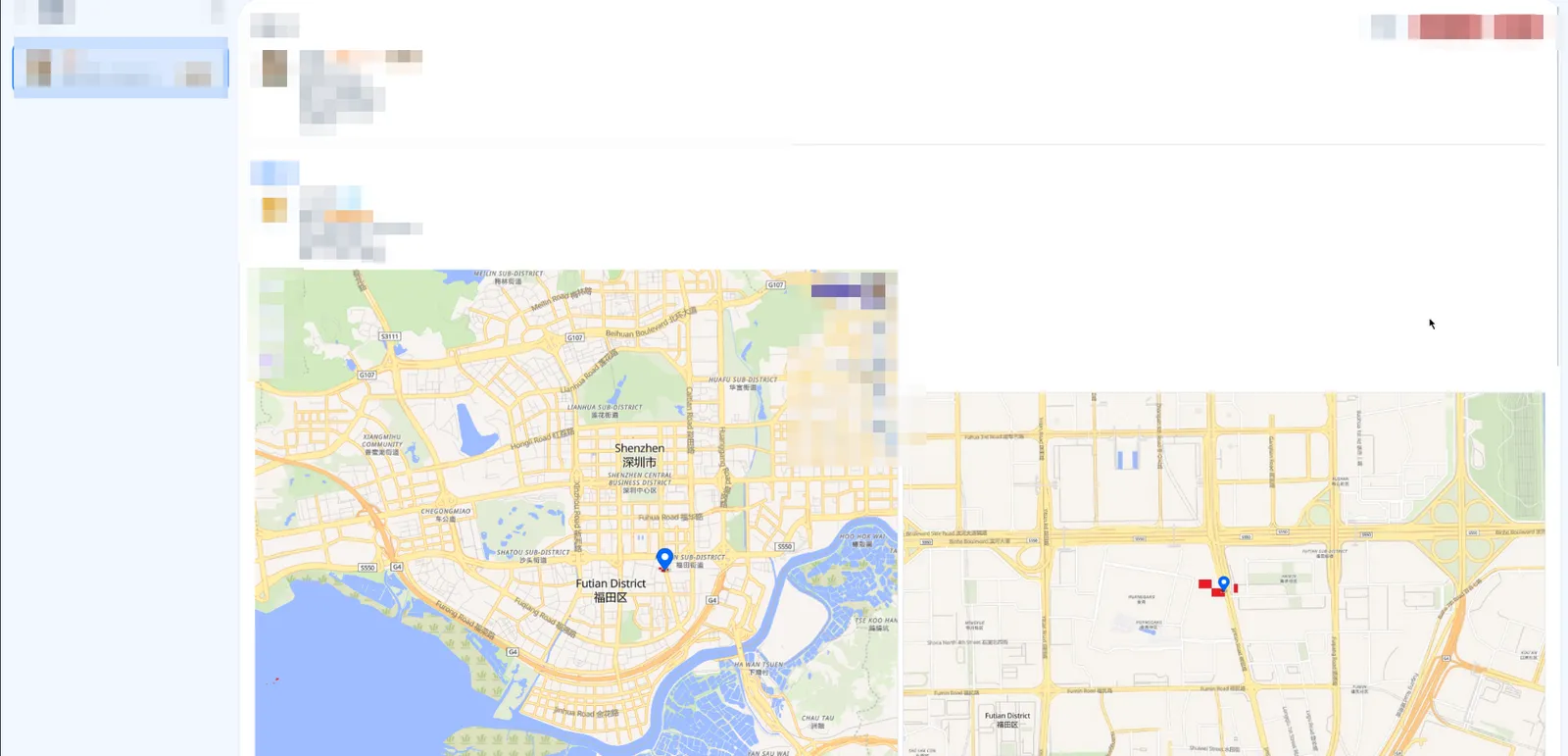
举报用户,举报时客户端会渲染一张截图,客服在查看时可以看到客户端的截图和现场截图
客服可以看见被举报的用户的IP下的所有用户。
请求
- 需要
j完成认证 - 请求体为multipart body
reportedUserId: 举报的用户IDlatitude: 纬度longitude: 经度zoom: 缩放reason: 举报原因notes: 举报文本,用户可以主动输入image: 客户端渲染的一张举报截图会显示在客服页面
示例请求
CURL
curl -X POST "https://backend.wplace.live/report-user" \
  -H "Content-Type: multipart/form-data" \
  -F "reportedUserId=1" \
  -F "latitude=22.544484678446224" \
  -F "longitude=114.09375473639432" \
  -F "zoom=15.812584063490982" \
  -F "reason=griefing" \
  -F "notes=Messed up artworks for no reason" \
  -F "image=@图片;type=image/jpeg"
原始请求体
------boundary
Content-Disposition: form-data; name="reportedUserId"

1
------boundary
Content-Disposition: form-data; name="latitude"

22.544484678446224
------boundary
Content-Disposition: form-data; name="longitude"

114.09375473639432
------boundary
Content-Disposition: form-data; name="zoom"

15.812584063490982
------boundary
Content-Disposition: form-data; name="reason"

griefing
------boundary
Content-Disposition: form-data; name="notes"

Messed up artworks for no reason
------boundary
Content-Disposition: form-data; name="image"; filename="report-1758232933710.jpeg"
Content-Type: image/jpeg

(binary file data)
------boundary--
反作弊
对于/s0/pixel/{tileX}/{tileY}接口wplace添加了多个反作弊措施防止自动绘制和多账号。
`lp` - LocalStorage检测
在登录之后Local Storage会写入lp字段,是一个base64编码的json,解码之后可以看到
{
	"userId": 1,
	"time": 1758235291531
}
其中包含了你的用户ID和登录时间戳,当你尝试提交绘制但是用户ID和Local Storage不一致时会提示你请勿使用多个账号绘制
解决方案
- 对于不跑在浏览器上的机器人或者脚本无视即可
- 使用多个浏览器配置文件
- 切换账号时候从Local Storage删除
lp
Turnstile - 验证码

wplace使用了Turnstile验证码,并且每次绘制之后会在前端清除已经保存的验证码。
通常来说这个验证码不会频繁弹出,但是如果服务器处于高负载启动了Under Attack模式则会在每次绘制之前弹出。
Site Key为0x4AAAAAABpqJe8FO0N84q0F
解决方案
- 打码平台付费自动通过验证码API
- 通过中间人代理抓取到
https://challenges.cloudflare.com中的cf-turnstile-response字段(在服务器没有开启Under Attack模式的情况下) - 自己打开一个浏览器挂脚本自动刷然后通过浏览器插件发回客户端。
FingerprintJS - 浏览器指纹
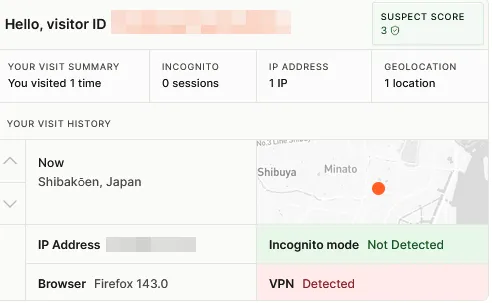
wplace使用FingerprintJS来上报visitorId(fp字段)来检测多账号和机器人。
也就是通过User-Agent, 屏幕分辨率, 时区等数据检测浏览器是不是无头、匿名模式等。
并且有0.001%的概率将你的信息卖给FingerprintJS的提供商。
function Q8() {
    if (!(window.__fpjs_d_m || Math.random() >= 0.001)) try {
        var _ = new XMLHttpRequest;
        _.open(
            'get',
            'https://m1.openfpcdn.io/fingerprintjs/v'.concat(I0, '/npm-monitoring'),
            !0
        ),
            _.send()
    } catch (s) {
        console.error(s)
    }
}
Wplace的JS中的真实代码,有0.001%的几率上传你的统计信息到FingerprintJS服务器
解决方案
- 严格来说wplace暂时没有完全启用此检测因为只上传了一个
visitorId(一个MD5值),理论上使用任何MD5都可以通过因为这个值无法从服务端校验,但是为了防止被检测到多账号建议使用MD5(userId + salt)
Pawtect
Pawtect是一个wplace最新最热引入的基于Rust编写的WASM模块,用于在请求之前对请求体进行签名,再通过请求头一同发送到服务器。
部分用户不会启用此检查,如果想知道某个账号是否启用了此检查,需要先请求/me获得其中的experiments信息,如果variant是disabled请求时候只需要传入x-pawtect-variant: disabled即可否则需要传入x-pawtect-variant和x-pawtect-token两个请求头。
解决方案
- 直接通过真实浏览器抓取(中间人代理或者浏览器插件)
- 如果你使用Java开发直接使用笔者开发的实现,在附录(需要Bouncy Castle)
- 通过下方参考代码加载WASM模块实现签名(如果你的脚本使用nodejs开发)
参考代码
let m;
let memory;
const textEncoder = new TextEncoder();
const textDecoder = new TextDecoder();
let J = 0;

function re(n, malloc, realloc) {
    if (realloc === undefined) {
        const s = textEncoder.encode(n);
        const ptr = malloc(s.length, 1) >>> 0;
        new Uint8Array(memory.buffer, ptr, s.length).set(s);
        J = s.length;
        return ptr;
    }
    let a = n.length;
    let ptr = malloc(a, 1) >>> 0;
    const mem = new Uint8Array(memory.buffer);
    let i = 0;
    for (; i < a; i++) {
        const code = n.charCodeAt(i);
        if (code > 0x7F) break;
        mem[ptr + i] = code;
    }
    if (i !== a) {
        if (i !== 0) n = n.slice(i);
        ptr = realloc(ptr, a, a = i + n.length * 3, 1) >>> 0;
        const view = new Uint8Array(memory.buffer, ptr + i, a - i);
        const { written } = textEncoder.encodeInto(n, view);
        i += written;
        ptr = realloc(ptr, a, i, 1) >>> 0;
    }
    J = i;
    return ptr;
}

function P(ptr, len) {
    return textDecoder.decode(new Uint8Array(memory.buffer, ptr, len));
}

function fn(n) {
    let e,
        t;
    try {
        const a = re(n, m.__wbindgen_malloc, m.__wbindgen_realloc),
            r = J,
            o = m.get_pawtected_endpoint_payload(a, r);
        return e = o[0],
            t = o[1],
            P(o[0], o[1])
    } finally {
        m.__wbindgen_free(e, t, 1)
    }
}

async function loadWASM() {
    const wasmBuffer = await readFile("./pawtect_wasm_bg.wasm");
    const imports = hn();
    const { instance } = await WebAssembly.instantiate(wasmBuffer, imports);
    m = instance.exports;
    memory = m.memory;
}

function hn() {
    const n = {};
    n.wbg = {};
    n.wbg.__wbg_buffer_609cc3eee51ed158 = e => e.buffer;
    n.wbg.__wbg_call_672a4d21634d4a24 = (e, t) => e.call(t);
    n.wbg.__wbg_call_7cccdd69e0791ae2 = (e, t, a) => e.call(t, a);
    n.wbg.__wbg_crypto_574e78ad8b13b65f = e => e.crypto;
    n.wbg.__wbg_getRandomValues_b8f5dbd5f3995a9e = (e, t) => e.getRandomValues(t);
    n.wbg.__wbg_msCrypto_a61aeb35a24c1329 = e => e.msCrypto;
    n.wbg.__wbg_new_a12002a7f91c75be = e => new Uint8Array(e);
    n.wbg.__wbg_newnoargs_105ed471475aaf50 = (e, t) => new Function(P(e, t));
    n.wbg.__wbg_newwithbyteoffsetandlength_d97e637ebe145a9a = (e, t, a) =>
        new Uint8Array(e, t >>> 0, a >>> 0);
    n.wbg.__wbg_newwithlength_a381634e90c276d4 = e => new Uint8Array(e >>> 0);
    n.wbg.__wbg_node_905d3e251edff8a2 = e => e.node;
    n.wbg.__wbg_process_dc0fbacc7c1c06f7 = e => e.process;
    n.wbg.__wbg_randomFillSync_ac0988aba3254290 = (e, t) => e.randomFillSync(t);
    n.wbg.__wbg_require_60cc747a6bc5215a = () => module.require;
    n.wbg.__wbg_set_65595bdd868b3009 = (e, t, a) => e.set(t, a >>> 0);
    n.wbg.__wbg_static_accessor_GLOBAL_88a902d13a557d07 = () =>
        typeof global === "undefined" ? null : global;
    n.wbg.__wbg_static_accessor_GLOBAL_THIS_56578be7e9f832b0 = () =>
        typeof globalThis === "undefined" ? null : globalThis;
    n.wbg.__wbg_static_accessor_SELF_37c5d418e4bf5819 = () =>
        typeof self === "undefined" ? null : self;
    n.wbg.__wbg_static_accessor_WINDOW_5de37043a91a9c40 = () =>
        typeof window === "undefined" ? null : window;
    n.wbg.__wbg_subarray_aa9065fa9dc5df96 = (e, t, a) => e.subarray(t >>> 0, a >>> 0);
    n.wbg.__wbg_versions_c01dfd4722a88165 = e => e.versions;
    n.wbg.__wbindgen_init_externref_table = () => {
        const e = m.__wbindgen_export_2;
        const t = e.grow(4);
        e.set(0, void 0);
        e.set(t + 0, void 0);
        e.set(t + 1, null);
        e.set(t + 2, true);
        e.set(t + 3, false);
    };
    n.wbg.__wbindgen_is_function = e => typeof e === "function";
    n.wbg.__wbindgen_is_object = e => typeof e === "object" && e !== null;
    n.wbg.__wbindgen_is_string = e => typeof e === "string";
    n.wbg.__wbindgen_is_undefined = e => e === void 0;
    n.wbg.__wbindgen_memory = () => m.memory;
    n.wbg.__wbindgen_string_new = (e, t) => P(e, t);
    n.wbg.__wbindgen_throw = (e, t) => {
        throw new Error(P(e, t));
    };
    return n;
}

// 需要自己添加post逻辑
// 示例传入:https://backend.wplace.live/s0/pixel/1/1, {}, 1
function postPaw(url, bodyStr, userId) {
    loadWASM();
    if (m.__wbindgen_start) m.__wbindgen_start();
    m.set_user_id(userId);
    const urlPtr = re(url, m.__wbindgen_malloc, m.__wbindgen_realloc);
    m.request_url(urlPtr, J);
    const loadPayload = m.get_load_payload();
    const sign = fn(bodyStr);
};
附录
通用API错误
{
  "error": "Unauthorized",
  "status": 401
}
未附带
jtoken 或者 token 无效
{
  "error": "Internal Server Error. We'll look into it, please try again later.",
  "status": 500
}
Cookie 已过期
{
  "error": "Bad Request",
  "status": 400
}
请求格式错误
全部颜色表
| 颜色 | ID | RGB | 是否付费 |
|---|---|---|---|
0 |
透明 | false |
|
 |
1 |
0, 0, 0 |
false |
 |
2 |
60, 60, 60 |
false |
 |
3 |
120, 120, 120 |
false |
 |
4 |
210, 210, 210 |
false |
 |
5 |
255, 255, 255 |
false |
 |
6 |
96, 0, 24 |
false |
 |
7 |
237, 28, 36 |
false |
 |
8 |
255, 127, 39 |
false |
 |
9 |
246, 170, 9 |
false |
 |
10 |
249, 221, 59 |
false |
 |
11 |
255, 250, 188 |
false |
 |
12 |
14, 185, 104 |
false |
 |
13 |
19, 230, 123 |
false |
 |
14 |
135, 255, 94 |
false |
 |
15 |
12, 129, 110 |
false |
 |
16 |
16, 174, 166 |
false |
 |
17 |
19, 225, 190 |
false |
 |
18 |
40, 80, 158 |
false |
 |
19 |
64, 147, 228 |
false |
 |
20 |
96, 247, 242 |
false |
 |
21 |
107, 80, 246 |
false |
 |
22 |
153, 177, 251 |
false |
 |
23 |
120, 12, 153 |
false |
 |
24 |
170, 56, 185 |
false |
 |
25 |
224, 159, 249 |
false |
 |
26 |
203, 0, 122 |
false |
 |
27 |
236, 31, 128 |
false |
 |
28 |
243, 141, 169 |
false |
 |
29 |
104, 70, 52 |
false |
 |
30 |
149, 104, 42 |
false |
 |
31 |
248, 178, 119 |
false |
 |
32 |
170, 170, 170 |
true |
 |
33 |
165, 14, 30 |
true |
 |
34 |
250, 128, 114 |
true |
 |
35 |
228, 92, 26 |
true |
 |
36 |
214, 181, 148 |
true |
 |
37 |
156, 132, 49 |
true |
 |
38 |
197, 173, 49 |
true |
 |
39 |
232, 212, 95 |
true |
 |
40 |
74, 107, 58 |
true |
 |
41 |
90, 148, 74 |
true |
 |
42 |
132, 197, 115 |
true |
 |
43 |
15, 121, 159 |
true |
 |
44 |
187, 250, 242 |
true |
 |
45 |
125, 199, 255 |
true |
 |
46 |
77, 49, 184 |
true |
 |
47 |
74, 66, 132 |
true |
 |
48 |
122, 113, 196 |
true |
 |
49 |
181, 174, 241 |
true |
 |
50 |
219, 164, 99 |
true |
 |
51 |
209, 128, 81 |
true |
 |
52 |
255, 197, 165 |
true |
 |
53 |
155, 82, 73 |
true |
 |
54 |
209, 128, 120 |
true |
 |
55 |
250, 182, 164 |
true |
 |
56 |
123, 99, 82 |
true |
 |
57 |
156, 132, 107 |
true |
 |
58 |
51, 57, 65 |
true |
 |
59 |
109, 117, 141 |
true |
 |
60 |
179, 185, 209 |
true |
 |
61 |
109, 100, 63 |
true |
 |
62 |
148, 140, 107 |
true |
 |
63 |
205, 197, 158 |
true |
BitMap Java实现
public class WplaceBitMap {
    private byte[] bytes;

    public WplaceBitMap() {
        this.bytes = new byte[0];
    }

    public WplaceBitMap(byte[] bytes) {
        this.bytes = bytes != null ? bytes : new byte[0];
    }

    public void set(int index, boolean value) {
        int byteIndex = index / 8;
        int bitIndex = index % 8;

        if (byteIndex >= bytes.length) {
            byte[] newBytes = new byte[byteIndex + 1];
            int offset = newBytes.length - bytes.length;
            System.arraycopy(bytes, 0, newBytes, offset, bytes.length);
            bytes = newBytes;
        }

        int realIndex = bytes.length - 1 - byteIndex;

        if (value) {
            bytes[realIndex] |= (1 << bitIndex);
        } else {
            bytes[realIndex] &= ~(1 << bitIndex);
        }
    }

    public boolean get(int index) {
        int byteIndex = index / 8;
        int bitIndex = index % 8;

        if (byteIndex >= bytes.length) {
            return false;
        }

        int realIndex = bytes.length - 1 - byteIndex;
        return (bytes[realIndex] & (1 << bitIndex)) != 0;
    }

    public String toBase64() {
        return Base64.getEncoder().encodeToString(bytes);
    }
}
全部旗帜
| 旗帜 | 地区代码 | ID |
|---|---|---|
| 🇦🇫 | AF |
1 |
| 🇦🇱 | AL |
2 |
| 🇩🇿 | DZ |
3 |
| 🇦🇸 | AS |
4 |
| 🇦🇩 | AD |
5 |
| 🇦🇴 | AO |
6 |
| 🇦🇮 | AI |
7 |
| 🇦🇶 | AQ |
8 |
| 🇦🇬 | AG |
9 |
| 🇦🇷 | AR |
10 |
| 🇦🇲 | AM |
11 |
| 🇦🇼 | AW |
12 |
| 🇦🇺 | AU |
13 |
| 🇦🇹 | AT |
14 |
| 🇦🇿 | AZ |
15 |
| 🇧🇸 | BS |
16 |
| 🇧🇭 | BH |
17 |
| 🇧🇩 | BD |
18 |
| 🇧🇧 | BB |
19 |
| 🇧🇾 | BY |
20 |
| 🇧🇪 | BE |
21 |
| 🇧🇿 | BZ |
22 |
| 🇧🇯 | BJ |
23 |
| 🇧🇲 | BM |
24 |
| 🇧🇹 | BT |
25 |
| 🇧🇴 | BO |
26 |
| 🇧🇶 | BQ |
27 |
| 🇧🇦 | BA |
28 |
| 🇧🇼 | BW |
29 |
| 🇧🇻 | BV |
30 |
| 🇧🇷 | BR |
31 |
| 🇮🇴 | IO |
32 |
| 🇧🇳 | BN |
33 |
| 🇧🇬 | BG |
34 |
| 🇧🇫 | BF |
35 |
| 🇧🇮 | BI |
36 |
| 🇨🇻 | CV |
37 |
| 🇰🇭 | KH |
38 |
| 🇨🇲 | CM |
39 |
| 🇨🇦 | CA |
40 |
| 🇰🇾 | KY |
41 |
| 🇨🇫 | CF |
42 |
| 🇹🇩 | TD |
43 |
| 🇨🇱 | CL |
44 |
| 🇨🇳 | CN |
45 |
| 🇨🇽 | CX |
46 |
| 🇨🇨 | CC |
47 |
| 🇨🇴 | CO |
48 |
| 🇰🇲 | KM |
49 |
| 🇨🇬 | CG |
50 |
| 🇨🇰 | CK |
51 |
| 🇨🇷 | CR |
52 |
| 🇭🇷 | HR |
53 |
| 🇨🇺 | CU |
54 |
| 🇨🇼 | CW |
55 |
| 🇨🇾 | CY |
56 |
| 🇨🇿 | CZ |
57 |
| 🇨🇮 | CI |
58 |
| 🇩🇰 | DK |
59 |
| 🇩🇯 | DJ |
60 |
| 🇩🇲 | DM |
61 |
| 🇩🇴 | DO |
62 |
| 🇪🇨 | EC |
63 |
| 🇪🇬 | EG |
64 |
| 🇸🇻 | SV |
65 |
| 🇬🇶 | GQ |
66 |
| 🇪🇷 | ER |
67 |
| 🇪🇪 | EE |
68 |
| 🇸🇿 | SZ |
69 |
| 🇪🇹 | ET |
70 |
| 🇫🇰 | FK |
71 |
| 🇫🇴 | FO |
72 |
| 🇫🇯 | FJ |
73 |
| 🇫🇮 | FI |
74 |
| 🇫🇷 | FR |
75 |
| 🇬🇫 | GF |
76 |
| 🇵🇫 | PF |
77 |
| 🇹🇫 | TF |
78 |
| 🇬🇦 | GA |
79 |
| 🇬🇲 | GM |
80 |
| 🇬🇪 | GE |
81 |
| 🇩🇪 | DE |
82 |
| 🇬🇭 | GH |
83 |
| 🇬🇮 | GI |
84 |
| 🇬🇷 | GR |
85 |
| 🇬🇱 | GL |
86 |
| 🇬🇩 | GD |
87 |
| 🇬🇵 | GP |
88 |
| 🇬🇺 | GU |
89 |
| 🇬🇹 | GT |
90 |
| 🇬🇬 | GG |
91 |
| 🇬🇳 | GN |
92 |
| 🇬🇼 | GW |
93 |
| 🇬🇾 | GY |
94 |
| 🇭🇹 | HT |
95 |
| 🇭🇲 | HM |
96 |
| 🇭🇳 | HN |
97 |
| 🇭🇰 | HK |
98 |
| 🇭🇺 | HU |
99 |
| 🇮🇸 | IS |
100 |
| 🇮🇳 | IN |
101 |
| 🇮🇩 | ID |
102 |
| 🇮🇷 | IR |
103 |
| 🇮🇶 | IQ |
104 |
| 🇮🇪 | IE |
105 |
| 🇮🇲 | IM |
106 |
| 🇮🇱 | IL |
107 |
| 🇮🇹 | IT |
108 |
| 🇯🇲 | JM |
109 |
| 🇯🇵 | JP |
110 |
| 🇯🇪 | JE |
111 |
| 🇯🇴 | JO |
112 |
| 🇰🇿 | KZ |
113 |
| 🇰🇪 | KE |
114 |
| 🇰🇮 | KI |
115 |
| 🇽🇰 | XK |
116 |
| 🇰🇼 | KW |
117 |
| 🇰🇬 | KG |
118 |
| 🇱🇦 | LA |
119 |
| 🇱🇻 | LV |
120 |
| 🇱🇧 | LB |
121 |
| 🇱🇸 | LS |
122 |
| 🇱🇷 | LR |
123 |
| 🇱🇾 | LY |
124 |
| 🇱🇮 | LI |
125 |
| 🇱🇹 | LT |
126 |
| 🇱🇺 | LU |
127 |
| 🇲🇴 | MO |
128 |
| 🇲🇬 | MG |
129 |
| 🇲🇼 | MW |
130 |
| 🇲🇾 | MY |
131 |
| 🇲🇻 | MV |
132 |
| 🇲🇱 | ML |
133 |
| 🇲🇹 | MT |
134 |
| 🇲🇭 | MH |
135 |
| 🇲🇶 | MQ |
136 |
| 🇲🇷 | MR |
137 |
| 🇲🇺 | MU |
138 |
| 🇾🇹 | YT |
139 |
| 🇲🇽 | MX |
140 |
| 🇫🇲 | FM |
141 |
| 🇲🇩 | MD |
142 |
| 🇲🇨 | MC |
143 |
| 🇲🇳 | MN |
144 |
| 🇲🇪 | ME |
145 |
| 🇲🇸 | MS |
146 |
| 🇲🇦 | MA |
147 |
| 🇲🇿 | MZ |
148 |
| 🇲🇲 | MM |
149 |
| 🇳🇦 | NA |
150 |
| 🇳🇷 | NR |
151 |
| 🇳🇵 | NP |
152 |
| 🇳🇱 | NL |
153 |
| 🇳🇨 | NC |
154 |
| 🇳🇿 | NZ |
155 |
| 🇳🇮 | NI |
156 |
| 🇳🇪 | NE |
157 |
| 🇳🇬 | NG |
158 |
| 🇳🇺 | NU |
159 |
| 🇳🇫 | NF |
160 |
| 🇰🇵 | KP |
161 |
| 🇲🇰 | MK |
162 |
| 🇲🇵 | MP |
163 |
| 🇳🇴 | NO |
164 |
| 🇴🇲 | OM |
165 |
| 🇵🇰 | PK |
166 |
| 🇵🇼 | PW |
167 |
| 🇵🇸 | PS |
168 |
| 🇵🇦 | PA |
169 |
| 🇵🇬 | PG |
170 |
| 🇵🇾 | PY |
171 |
| 🇵🇪 | PE |
172 |
| 🇵🇭 | PH |
173 |
| 🇵🇳 | PN |
174 |
| 🇵🇱 | PL |
175 |
| 🇵🇹 | PT |
176 |
| 🇵🇷 | PR |
177 |
| 🇶🇦 | QA |
178 |
| 🇨🇩 | CD |
179 |
| 🇷🇴 | RO |
180 |
| 🇷🇺 | RU |
181 |
| 🇷🇼 | RW |
182 |
| 🇷🇪 | RE |
183 |
| 🇧🇱 | BL |
184 |
| 🇸🇭 | SH |
185 |
| 🇰🇳 | KN |
186 |
| 🇱🇨 | LC |
187 |
| 🇲🇫 | MF |
188 |
| 🇵🇲 | PM |
189 |
| 🇻🇨 | VC |
190 |
| 🇼🇸 | WS |
191 |
| 🇸🇲 | SM |
192 |
| 🇸🇹 | ST |
193 |
| 🇸🇦 | SA |
194 |
| 🇸🇳 | SN |
195 |
| 🇷🇸 | RS |
196 |
| 🇸🇨 | SC |
197 |
| 🇸🇱 | SL |
198 |
| 🇸🇬 | SG |
199 |
| 🇸🇽 | SX |
200 |
| 🇸🇰 | SK |
201 |
| 🇸🇮 | SI |
202 |
| 🇸🇧 | SB |
203 |
| 🇸🇴 | SO |
204 |
| 🇿🇦 | ZA |
205 |
| 🇬🇸 | GS |
206 |
| 🇰🇷 | KR |
207 |
| 🇸🇸 | SS |
208 |
| 🇪🇸 | ES |
209 |
| 🇱🇰 | LK |
210 |
| 🇸🇩 | SD |
211 |
| 🇸🇷 | SR |
212 |
| 🇸🇯 | SJ |
213 |
| 🇸🇪 | SE |
214 |
| 🇨🇭 | CH |
215 |
| 🇸🇾 | SY |
216 |
| 🇨🇳 | TW |
217 |
| 🇹🇯 | TJ |
218 |
| 🇹🇿 | TZ |
219 |
| 🇹🇭 | TH |
220 |
| 🇹🇱 | TL |
221 |
| 🇹🇬 | TG |
222 |
| 🇹🇰 | TK |
223 |
| 🇹🇴 | TO |
224 |
| 🇹🇹 | TT |
225 |
| 🇹🇳 | TN |
226 |
| 🇹🇲 | TM |
227 |
| 🇹🇨 | TC |
228 |
| 🇹🇻 | TV |
229 |
| 🇹🇷 | TR |
230 |
| 🇺🇬 | UG |
231 |
| 🇺🇦 | UA |
232 |
| 🇦🇪 | AE |
233 |
| 🇬🇧 | GB |
234 |
| 🇺🇸 | US |
235 |
| 🇺🇲 | UM |
236 |
| 🇺🇾 | UY |
237 |
| 🇺🇿 | UZ |
238 |
| 🇻🇺 | VU |
239 |
| 🇻🇦 | VA |
240 |
| 🇻🇪 | VE |
241 |
| 🇻🇳 | VN |
242 |
| 🇻🇬 | VG |
243 |
| 🇻🇮 | VI |
244 |
| 🇼🇫 | WF |
245 |
| 🇪🇭 | EH |
246 |
| 🇾🇪 | YE |
247 |
| 🇿🇲 | ZM |
248 |
| 🇿🇼 | ZW |
249 |
| 🇦🇽 | AX |
250 |
| 🇮🇨 | IC |
251 |
pawtect java
import org.apache.commons.codec.digest.DigestUtils;

import java.nio.ByteBuffer;
import java.nio.ByteOrder;
import java.nio.charset.StandardCharsets;
import java.security.SecureRandom;
import java.util.Base64;

public class Pawtect {
    private static final byte[] KEY = new byte[32];
    static {
        for (int i = 0; i < 32; i++) {
            KEY[i] = (byte) ((i % 2 == 0) ? 19 : 55);
        }
    }
    public static String sign(String body) throws Exception {
        ByteBuffer buf = ByteBuffer.allocate(1024);
        buf.order(ByteOrder.LITTLE_ENDIAN);
        buf.putInt(0xAC831369);
        buf.put((byte) 0x00);
        buf.put(DigestUtils.sha256(body));
        buf.putShort((short) 0);
        buf.putInt(1);
        byte[] hb = "backend.wplace.live".getBytes(StandardCharsets.UTF_8);
        buf.putInt(hb.length);
        buf.put(hb);
        byte[] plaintext = new byte[buf.position()];
        buf.flip();
        buf.get(plaintext);
        SecureRandom random = new SecureRandom();
        byte[] nonce = new byte[24];
        random.nextBytes(nonce);
        XChaCha20Poly1305 cipher = new XChaCha20Poly1305(KEY);
        byte[] ciphertext = cipher.encrypt(nonce, plaintext);
        String ctB64 = Base64.getEncoder().encodeToString(ciphertext);
        String nonceB64 = Base64.getEncoder().encodeToString(nonce);
        return ctB64 + "." + nonceB64;
    }
}import org.bouncycastle.crypto.engines.ChaCha7539Engine;
import org.bouncycastle.crypto.macs.Poly1305;
import org.bouncycastle.crypto.params.KeyParameter;
import org.bouncycastle.crypto.params.ParametersWithIV;
import java.nio.ByteBuffer;
import java.nio.ByteOrder;
import java.util.Arrays;
public class XChaCha20Poly1305 {
private final byte[] key;
public XChaCha20Poly1305(byte[] key) {
if (key.length != 32) {
throw new IllegalArgumentException("Key must be 32 bytes");
}
this.key = Arrays.copyOf(key, 32);
}
public byte[] encrypt(byte[] nonce24, byte[] plaintext) throws Exception {
if (nonce24.length != 24) {
throw new IllegalArgumentException("Nonce must be 24 bytes for XChaCha20");
}
byte[] subKey = hchacha20(key, Arrays.copyOfRange(nonce24, 0, 16));
byte[] nonce12 = new byte[12];
nonce12[0] = 0;
nonce12[1] = 0;
nonce12[2] = 0;
nonce12[3] = 0;
System.arraycopy(nonce24, 16, nonce12, 4, 8);
ChaCha7539Engine chacha = new ChaCha7539Engine();
chacha.init(true, new ParametersWithIV(new KeyParameter(subKey), nonce12));
byte[] polyKey = new byte[64];
chacha.processBytes(polyKey, 0, polyKey.length, polyKey, 0);
byte[] ciphertext = new byte[plaintext.length];
chacha.processBytes(plaintext, 0, plaintext.length, ciphertext, 0);
Poly1305 poly1305 = new Poly1305();
poly1305.init(new KeyParameter(Arrays.copyOf(polyKey, 32)));
int aadLen = 0;
poly1305.update(ciphertext, 0, ciphertext.length);
int rem = ciphertext.length % 16;
if (rem != 0) {
poly1305.update(new byte[16 - rem], 0, 16 - rem);
}
poly1305.update(ByteBuffer.allocate(8).order(ByteOrder.LITTLE_ENDIAN).putLong(aadLen).array(), 0, 8);
poly1305.update(ByteBuffer.allocate(8).order(ByteOrder.LITTLE_ENDIAN).putLong(ciphertext.length).array(), 0, 8);
byte[] tag = new byte[16];
poly1305.doFinal(tag, 0);
ByteBuffer out = ByteBuffer.allocate(ciphertext.length + 16);
out.put(ciphertext);
out.put(tag);
return out.array();
}
private static byte[] hchacha20(byte[] key, byte[] nonce16) {
int[] state = new int[16];
byte[] sigma = "expand 32-byte k".getBytes();
state[0] = toIntLE(sigma, 0);
state[1] = toIntLE(sigma, 4);
state[2] = toIntLE(sigma, 8);
state[3] = toIntLE(sigma, 12);
for (int i = 0; i < 8; i++) {
state[4 + i] = toIntLE(key, i * 4);
}
state[12] = toIntLE(nonce16, 0);
state[13] = toIntLE(nonce16, 4);
state[14] = toIntLE(nonce16, 8);
state[15] = toIntLE(nonce16, 12);
for (int i = 0; i < 10; i++) {
quarterRound(state, 0, 4, 8, 12);
quarterRound(state, 1, 5, 9, 13);
quarterRound(state, 2, 6, 10, 14);
quarterRound(state, 3, 7, 11, 15);
quarterRound(state, 0, 5, 10, 15);
quarterRound(state, 1, 6, 11, 12);
quarterRound(state, 2, 7, 8, 13);
quarterRound(state, 3, 4, 9, 14);
}
ByteBuffer out = ByteBuffer.allocate(32).order(java.nio.ByteOrder.LITTLE_ENDIAN);
out.putInt(state[0]);
out.putInt(state[1]);
out.putInt(state[2]);
out.putInt(state[3]);
out.putInt(state[12]);
out.putInt(state[13]);
out.putInt(state[14]);
out.putInt(state[15]);
return out.array();
}
private static void quarterRound(int[] s, int a, int b, int c, int d) {
s[a] += s[b]; s[d] = rotl(s[d] ^ s[a], 16);
s[c] += s[d]; s[b] = rotl(s[b] ^ s[c], 12);
s[a] += s[b]; s[d] = rotl(s[d] ^ s[a], 8);
s[c] += s[d]; s[b] = rotl(s[b] ^ s[c], 7);
}
private static int rotl(int x, int n) {
return (x << n) | (x >>> (32 - n));
}
private static int toIntLE(byte[] bs, int off) {
return (bs[off] & 0xff) |
((bs[off+1] & 0xff) << 8) |
((bs[off+2] & 0xff) << 16) |
((bs[off+3] & 0xff) << 24);
}
}
订阅更新
如果您喜欢我的文章,输入您的邮箱订阅更新,有新的文章会通知您
登录 GitHub 后参与讨论
加载评论中…